Release 6.7.5
04 Dec. 2025
Enhanced Device-specific Events Report
We’re excited to introduce new functionality in the Device Specific Events Report to improve flexibility and user experience.
1. Show History Option
A new input field labeled “Show Message History” has been added to the report filter panel.
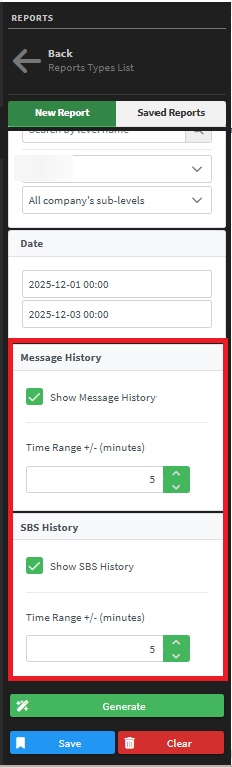
- Users can enable this option to enter a custom time range in minutes (default: ±5 minutes).
- When enabled, the report results will include a new column “Message history” containing a link to Show History.
- Clicking the link opens the Vehicle Path History page in a new tab, automatically filtered to the selected time range for the corresponding vehicle.

2. Show Second-by-second (SBS) Option
A new input field labeled “Show SBS” has been added to the report filter panel.
-
Users can enable this option to enter a custom time range in minutes (default: ±5 minutes).
-
When enabled, the report results will include a new column “SBS History” containing a link to Show SBS.
-
Clicking the link opens the Second-by-Second Report page in a new tab, pre-filtered for the selected vehicle and time range, similar to the existing dialog experience.