Release 6.9.2
2 Apr. 2026
1. Vehicle Offline Thresholds
Overview
This release introduces major improvements to how vehicle offline status is determined.
The update enhances configurability, accuracy, and reliability in handling vehicle communication and status tracking.
What’s New
1. Unified Vehicle Offline Thresholds
We have standardized the logic used to determine when a vehicle is considered offline across the entire system.
Key Changes
-
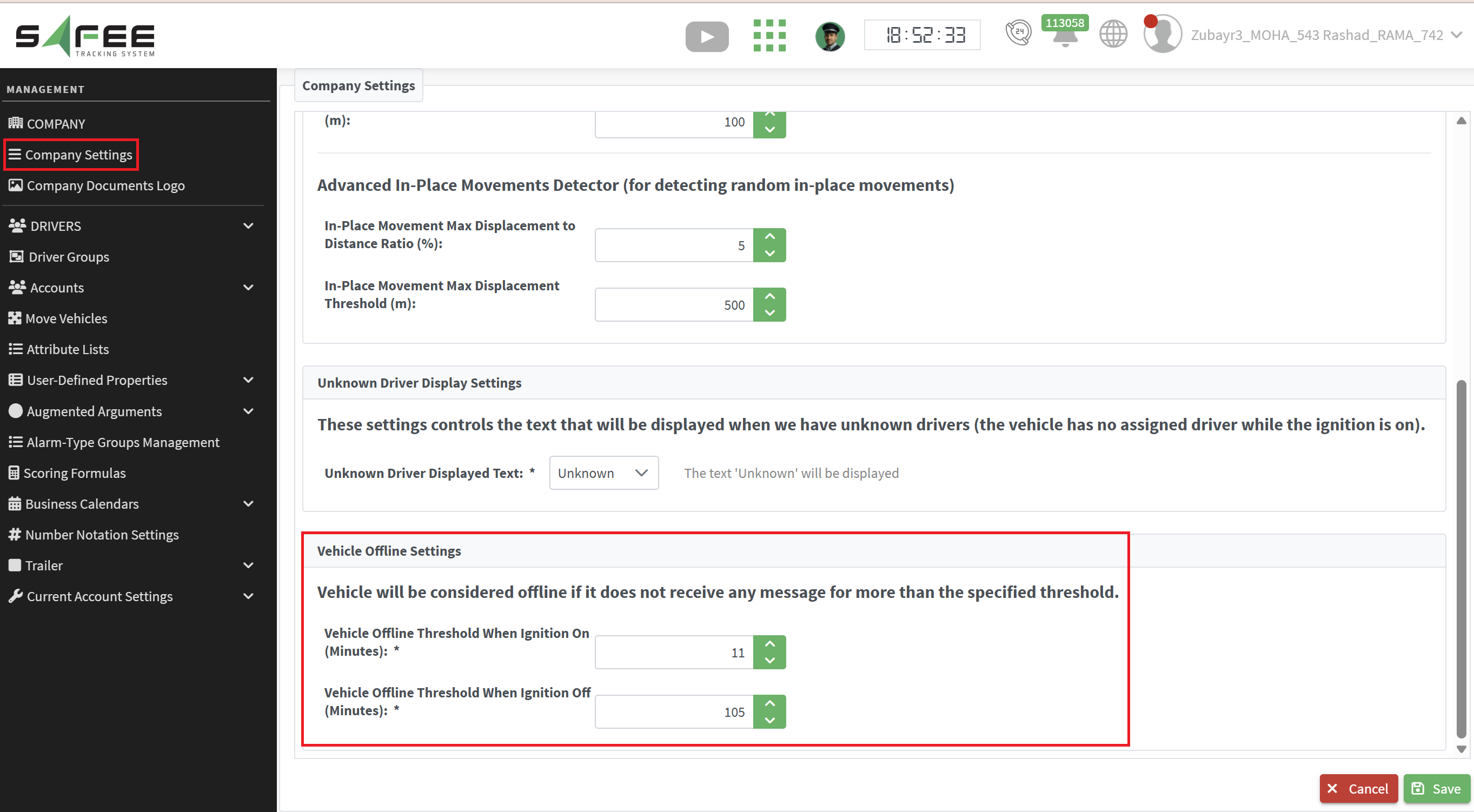
Introduced two configurable thresholds:
- Ignition ON threshold
- Ignition OFF threshold
-
These thresholds can now be configured per company from the Company Settings page.
-
Values ranges are:
- [10, 700] minutes when ignition on
- [100, 1400] minutes when ignition off
2. System-wide Adoption of New Thresholds
The new thresholds are now used consistently across multiple system components:
-
Vehicle Status Updater
- Determines the current vehicle status to be displayed on the monitoring page and to be used in offline widget on the dashboard page based on the new thresholds.
-
Missing Communication Alarm Generator
- Now depends on the new configurable thresholds instead of a fixed implicit single threshold.
- The threshold used is based on the vehicle’s latest ignition state.
- Enhanced Missing Communication Alarm description to include:
- The applied threshold
- The ignition state
- Will no longer trigger alarms for vehicles that never receive any data.
- Alarms are only triggered if the vehicle was previously sending data and then stopped.
Benefits
- Unified offline detection logic across the system
- Greater flexibility with per-company configuration
- More accurate no-signal detection
- Improved alarm reliability with fewer false alerts
2. Daily Excessive Driving Alarm Condition
We introduced a new alarm condition to monitor and detect excessive cumulative driving time per driver on a daily basis.
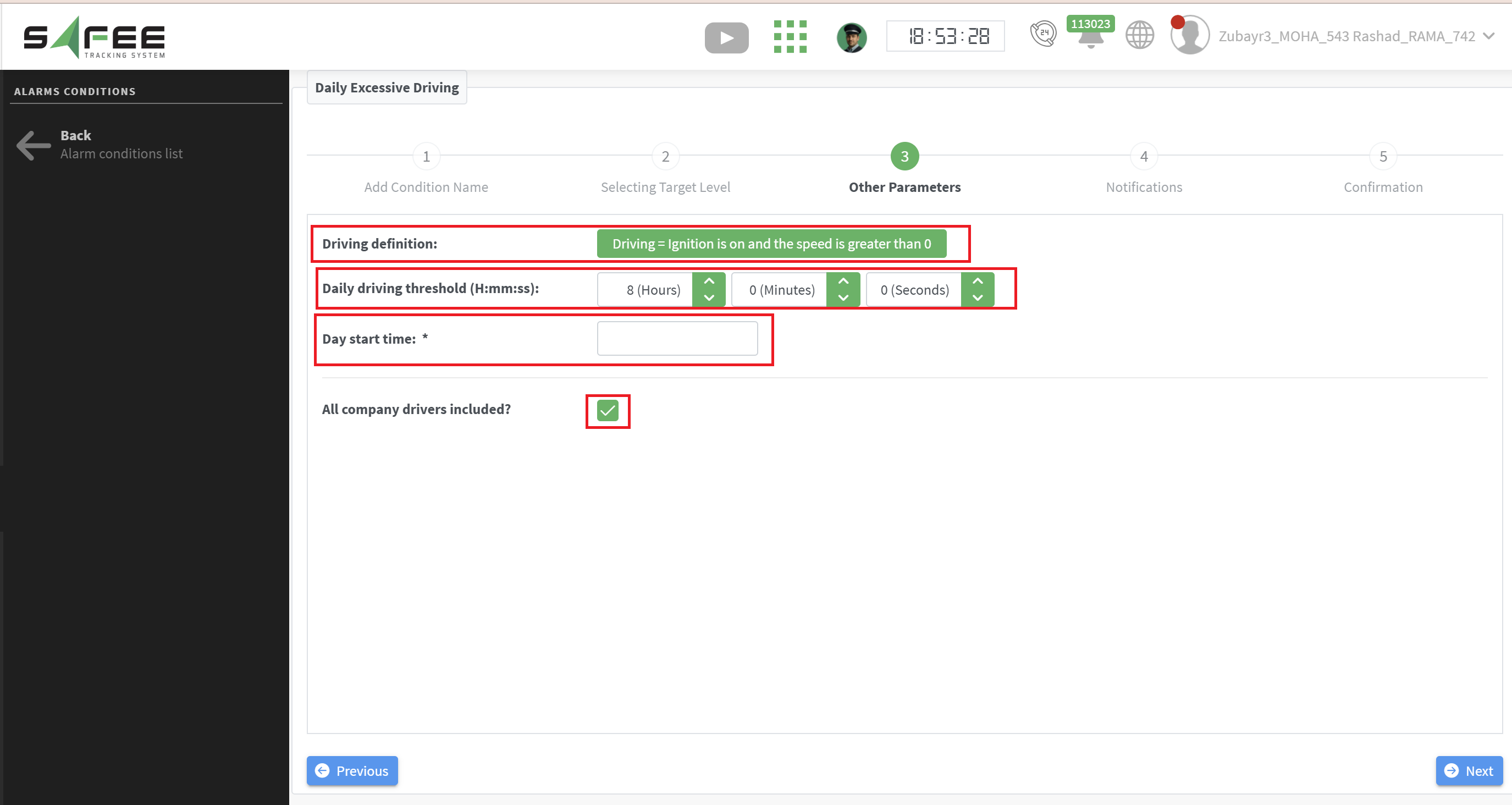
In the Alarm Condition Wizard, you will find the following main features/conditions:
-
Automatic Assignment:
The alarm condition is automatically assigned to all company vehicles upon creation (Step [2]), with the option to further customize and specify the applicable drivers in Step [3]. -
Flexible Driving Definition:
You can define what qualifies as “driving” based on one of the following criteria:- Ignition ON
- Ignition ON with speed > 0
-
Configurable Daily Driving Threshold:
A daily driving limit can be set per driver or group of drivers. The system accumulates each driver’s total driving time across all vehicles they operate.
Once the total exceeds the configured “Daily Driving Threshold (H:mm:ss )”, an alarm is triggered. The alarm includes:- Total accumulated driving time at the moment of triggering
- The configured threshold
- The duration of the violation
- As long as the vehicle remains with ignition ON, the system continues accumulating driving time within the same alarm. When the ignition is turned OFF, the alarm is closed. If the driver resumes driving after exceeding the threshold, a new alarm will be triggered accordingly.
-
Configurable Driving Day Start Time:
You can define the start time of the driving day. The system will monitor and accumulate driving time for each driver over a 24-hour period starting from this defined time.
The alarm condition will trigger an alarm each time a corresponding driver starts driving after exceeding the defined threshold within the same day.
It is important to highlight the difference between this new alarm condition and the existing “Driver Excessive Accumulative Driving” condition:
The new alarm triggers immediately once the defined threshold is exceeded and resets the violation counter at the end of the configured driving day. In contrast, the existing alarm continues accumulating the violation duration until the configured periodic “next execution time” is reached, at which point the alarm is triggered.