Release 6.10.2
27 Aug. 2026
1. Background Operations Monitoring
A new Background Operations panel has been added to help users monitor bulk operations that are processed in the background.
Operation Monitoring
Users can now access the Background Operations panel from the top bar to view the status and progress of their background operations.

The panel displays:
- Request Time – When the operation was submitted.
- Operation Type – The type of operation being processed.
- Last Update – The latest update to the operation.
- Overall – Total number of jobs.
- Successful – Number of successfully completed jobs.
- Failure – Number of failed jobs.
- Remaining – Number of jobs still being processed.
Operation Status
The operation status is updated automatically as processing progresses:
- Pending
- In Progress
- Successful
- Failure
- Completed
Status Indicator
The top-bar icon provides a quick indication of the operation status:
- A red badge indicates that one or more operations are still in progress.
- The badge becomes neutral when all operations are finished.
- The icon is hidden when there are no background operations to display.
This enhancement provides users with clear visibility into the progress and results of their background operations.
2. Dynamic Driver Assignment Improvements
The Dynamic Driver module has been enhanced with a new company-level setting that provides greater control over driver reassignment between vehicles.
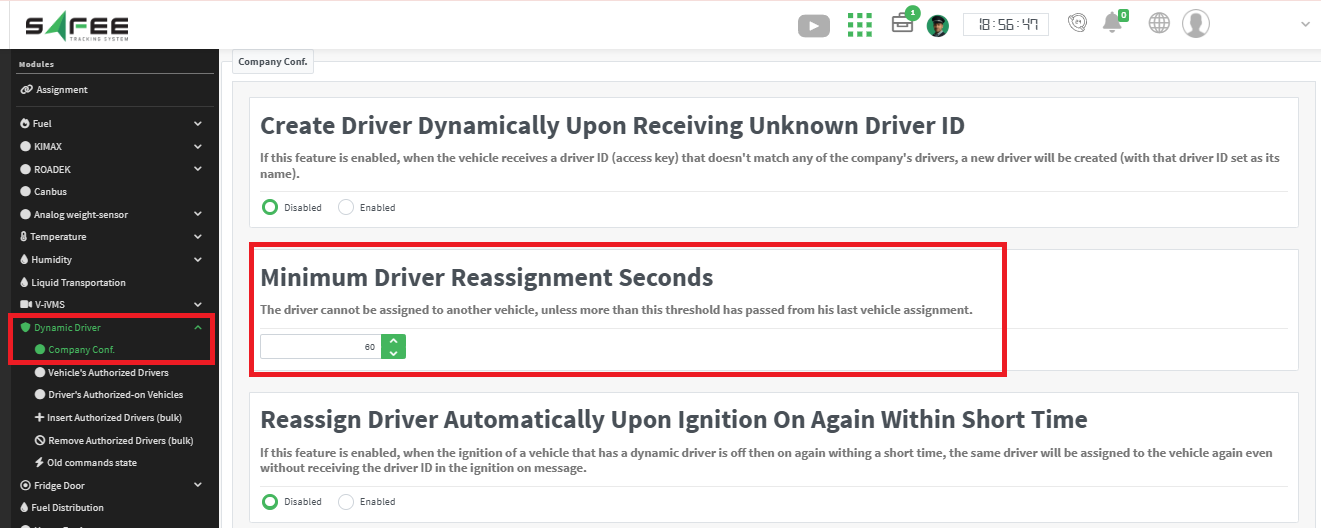
Minimum Time Between Driver Reassignments
A new configurable threshold has been added to the Dynamic Driver Company Settings page.
This setting allows administrators to define the minimum allowed time ( by default 60 s) between two consecutive driver assignments to different vehicles, helping prevent unintended rapid reassignment caused by invalid or duplicate driver messages.
Benefits
- Provides greater control over dynamic driver reassignment behavior.
- Helps reduce incorrect driver movements between vehicles caused by unreliable data.
- Allows each company to configure the threshold according to its operational needs.
Data Quality Improvements
Additional improvements have been made to enhance the accuracy and reliability of driver assignment records by preventing the creation of invalid short-duration assignments and improving overall driver assignment performance.
3. Asset Utilization Report Enhancements
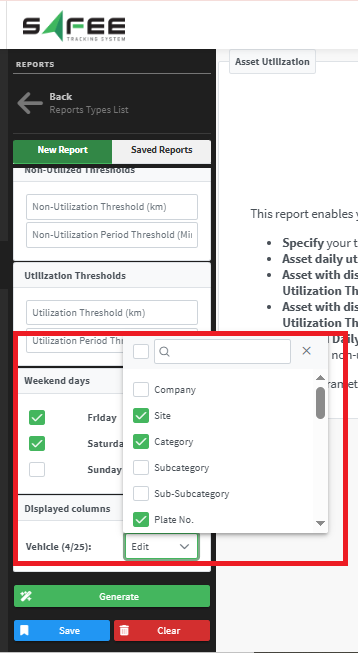
The Asset Utilization report has been enhanced to provide greater flexibility in selecting the vehicle information displayed in the report.
Vehicle Attribute Selector
A new Vehicle Attributes selector (displayed columns) has been added to the report input, replacing the previously fixed vehicle attribute columns.
Users can now select the vehicle attributes they want to display in the report based on their needs.
The attributes available in the selector are managed through the Attribute List page under the Management tab.
This enhancement provides greater flexibility and allows users to customize the report based on the vehicle attributes relevant to their operations.