Release 6.10.0
6 Aug. 2026
Introducing Amin (Beta) — Your New AI Assistant
We are thrilled to announce the launch of our AI Assistant: “Amin”, our first-ever intelligent chat interface, now available directly within your platform. Designed to be your on-demand co-pilot, Amin is here to help you find answers, understand data, and navigate the platform faster than ever before.
This guide walks you through what Amin is, how it differs from our existing tools, and how to maximize its new features.
1. What is Amin Assistant? (Basic vs. AI)
Amin offers two distinct tiers, depending on your organization’s licensed plan. Each is designed for a different type of interaction:
1. Basic Amin (Q&A) — Your Searchable Knowledge Base
This tier is powered entirely by a curated collection of pre-approved questions and answers, prepared in advance by our support team.

- How it works: To find what you need, simply type a keyword or phrase into the search box. The system instantly filters and displays a dynamic list of relevant prepared questions containing that term.
- Getting your answer: Browse the list, and click on any question that matches your interest. The full question and its corresponding answer will open immediately for you to read.
- Best for: Quick, verified, and static answers to common platform How‑To queries, troubleshooting steps, and frequently asked policies.
- In case you did not find the question that fits your inquiry, please contact our support team at helpdesk@safee.com.
2. Amin AI (Generative) — Your Intelligent Conversational Partner
This tier takes things to the next level with advanced generative intelligence. Instead of searching through a fixed library, you are now engaging in a true conversation.
- How it works: Type your question exactly as you would ask a colleague — in natural, everyday language. No keywords, no searching through lists. Amin AI interprets your intent and generates a unique, tailored response on the spot.
- Conversational flow: Unlike Basic Amin, Amin AI remembers the context of your ongoing conversation. You can ask follow-up questions, request clarifications, and dive deeper into complex topics without repeating yourself.
- Handling complexity: It excels at unstructured, ambiguous, or “why/how” types of questions that go beyond the scope of static help articles.
- Best for: Exploratory analysis, contextual insights, and any scenario where you need a dynamic back-and-forth rather than a fixed answer.
A quick summary:
Use Basic Amin for a fast, reliable look-up of known facts. Use Amin AI when you need a thinking partner to interpret, explain, and guide you through more complex subjects in real-time.
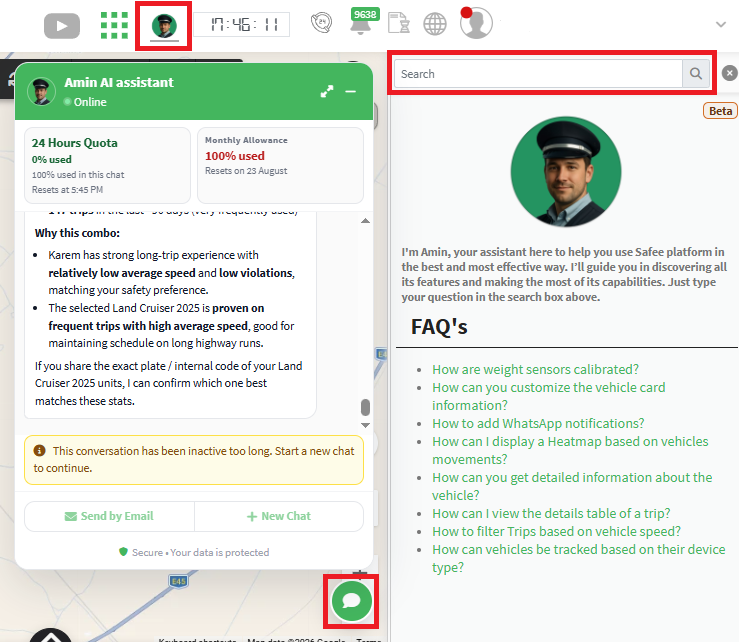
Activation Note: If the floating Amin icon does not appear on your platform, please reach out to your partner administrator or the platform helpdesk to request activation for your organization.
2. Amin AI Chatbot vs. Standard Platform Reports — A Clear Distinction
It is crucial to understand how Amin AI complements our core reporting engine.
- Standard Reports/Dashboards are the absolute foundation of your analytics. They are your definitive, authoritative source for structured, historical data. Reports provide exact figures, fixed tables, quantitative trends, and exportable dashboards that your daily operations and compliance rely on. They tell you exactly what the numbers are.
- Amin AI, on the other hand, serves as a complementary conversational layer. While Reports and Dashboards excel at delivering hard metrics, Amin AI allows you to ask qualitative “why” and “how” questions in plain English. Need a quick summary of a complex trend, or want to explore contextual insights without building a new query? Amin AI can guide you there interactively.
Think of it this way: Your Standard Reports are your definitive data library — essential, permanent, and non-negotiable. Amin AI is your conversational guide who helps you navigate and interpret that library more efficiently, without altering the underlying source data.
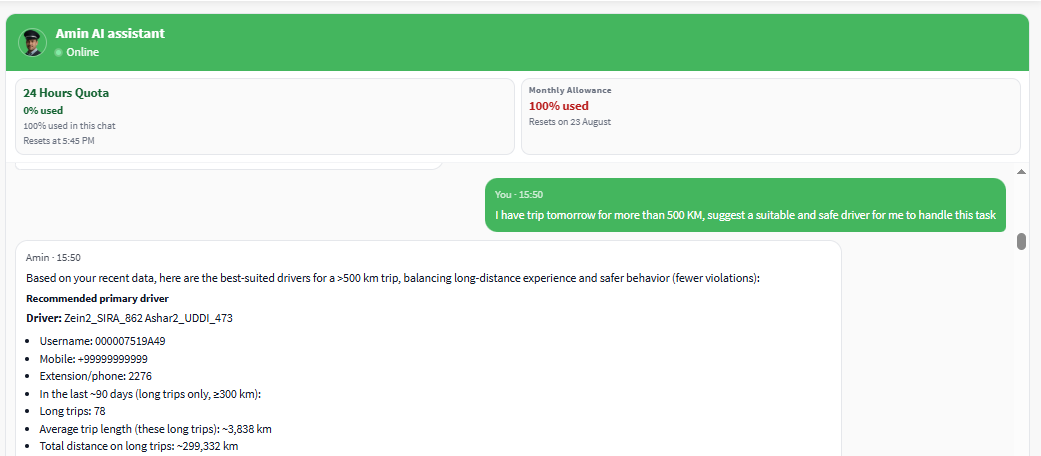
3. Understanding Your Chat Widget Dashboard
As a company admin, you will see Amin chat bubble (a floating icon) on all web pages once the feature is enabled. To keep you fully informed, the chat window displays a clear, real-time status widget with four specific metrics, described below in order:
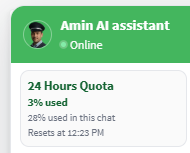
- Session Time Limit — The first duration you see on this widget shows the total duration assigned to your company for this cycle (e.g., 24 hours).
- Crucial rule: A dedicated usage quota is tied to this exact duration. If your questions consume the entire quota before the session timer resets, the chat input will temporarily pause, and you will not be able to ask new questions until the reset time arrives.
- Overall Usage (%) — This displays the percentage of your total dedicated quota that has been consumed across all chats during this current session cycle.
- Current Chat Usage (%) — This displays the percentage of your quota consumed specifically within your active conversation window (separate from your overall usage).
- Reset Time — The final line clearly shows the exact time when your session cycle ends. At this moment, your quota resets, and the timer refreshes for a new cycle as long as your monthly quota has not been exceeded.
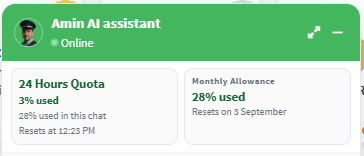
Note on usage calculation: Consumption is fully dynamic. Depending on the complexity of your question and the volume of information the AI needs to retrieve, some questions may consume more of your quota than others. The widget keeps you informed in real-time, so you are never caught off guard.
Idle Timeout: If you step away, the session will automatically end after a brief idle period to conserve resources. Don’t worry — you can simply start a fresh session instantly when you return.
4. Using the New Floating Chat Window
We designed the chat window to be a seamless part of your workflow:
- Persistent & Floating: The chat box stays anchored to your screen as you navigate between different pages. Your conversation continues uninterrupted, even when you move from the Dashboard to the Reports section.
- Drag & Minimize: Need more screen space? You can drag the window anywhere on your screen or click the minus (-) button to minimize it into a small bubble, keeping it out of your way until you need it again.
- Maximize for Full View: Click the maximize icon located in the chat header. This instantly opens a dedicated, full-page chat view where you can see your active conversation alongside a comprehensive list of all your previously saved chats in one organized layout, making it easy to browse, reference, and manage your entire interaction history.

5. Managing Your Conversations
Amin gives you complete control over your chat interactions:
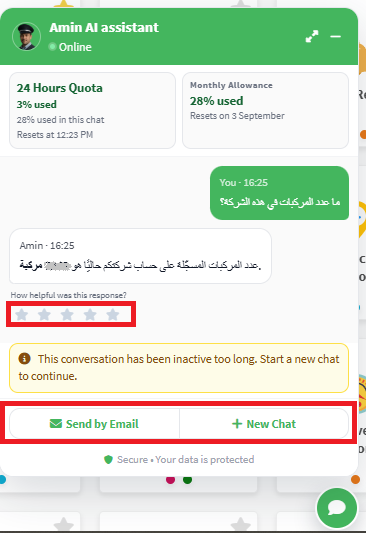
- New Chat: Start a fresh conversation at any time by clicking the New Chat button. This instantly clears your current chat window and opens a brand‑new conversation, allowing you to switch topics without manually deleting previous messages. (Note: This action does not consume extra quota or reset your session time limits — it simply refreshes your active view).
- Email Transcript: Need to have a copy of the AI’s response in your Email? Use the Send by Email action. The transcript will be automatically sent to the primary email address configured in your company account settings.
6. Provide Instant Feedback
We believe in continuous improvement. For every single question you ask Amin AI, you will see a 5-star rating prompt.
Please take a moment to rate your experience! This direct feedback helps us fine-tune Amin’s accuracy, adjust its reasoning, and ensure it becomes more helpful with every update. As a beta version, errors may happen; your feedback will be highly appreciated to improve this new feature.
We hope you enjoy the new Assistant experience. For any activation inquiries, remember to contact your partner administrator. Happy exploring!
7. Privacy Notice:
Amin works as AI assistant to answer your questions using your fleet data, but it never expose your data to external party. The main concept of the implemented AI model is that we learn it our data structure and the tables structure where it can find answers insdie them. The AI model understands your question, then generates the suitable queries to build the answer of your question.
Our internal DB engine runs the generated queries internally and send you the answer to the UI without exposing your data privacy to any exteranl party outside our secure environment.
Backup Battery Percentage
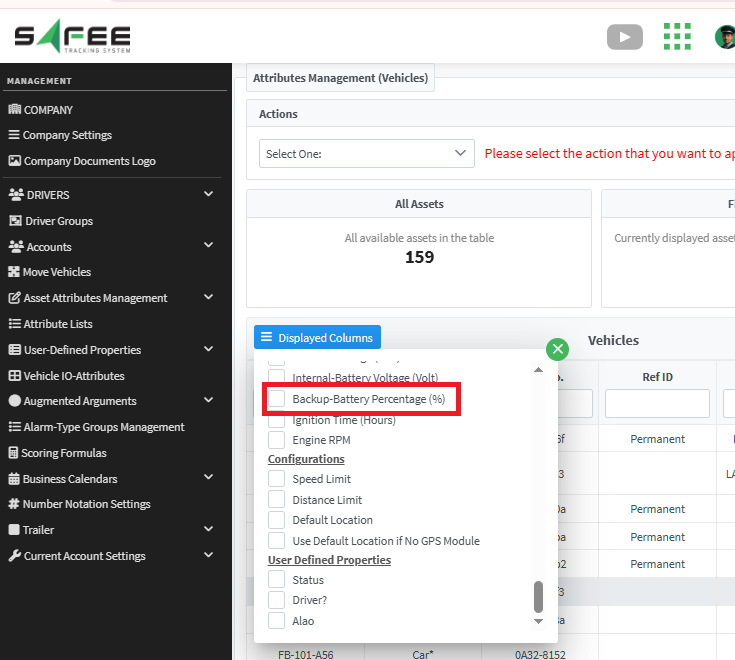
We’ve expanded our device health monitoring capabilities. In addition to the existing Vehicle Battery Voltage and AVL Device Battery levels, we have now added the Backup‑Battery Percentage for the AVL device.
What’s new?
You can now view the exact charge percentage of the internal backup battery residing inside the AVL device. This provides a complete, three‑dimensional view of your assets’ power status — covering the vehicle itself, the device’s fail‑safe backup voltage level and percentage.
Where to find it
The new Backup‑Battery Percentage column/field is now integrated into all the places you already check your battery voltage level, including but not limited to:
- Monitoring Page – Visible on the live vehicle cards and in the bottom panel table if enabled.
- Communication & Message History Reports – Check the latest backup level and percentage in the last message and full message history details.
- Vehicle Explorer & Bulk Management – Add it as an optional column to customize your vehicle lists.
Why it matters
The backup battery ensures your AVL device continues transmitting data during vehicle power loss. However, different AVL hardware models report this status differently: some provide the raw voltage reading, while others provide the charge percentage directly. With this enhancement, you can now view the backup level and percentage whenever the device supports it — giving you a more intuitive, at‑a‑glance understanding of remaining capacity. By monitoring this value, you can proactively identify devices with aging or failing backup batteries, schedule maintenance, and ensure uninterrupted telemetry coverage.