Release 6.9.7
21 May 2026
1. Driver Workload Report Enhancements
The Driver Workload Report has been completely redesigned and refactored to provide better performance, flexibility, and visibility into driver activity.
New Features
Daily Grouping
- Added a new Daily Grouping option.
- When enabled, the report groups data by full days only and ignores the time portion of dates.
Working Hours
- Added a new Working Hours Only option.
- When enabled, the report calculates driving time based on the selected working calendar and configured working hours.
Business Calendar Support
- Added a Business Calendar selector.
- The selected calendar will be used when the Working Hours Only option is enabled.
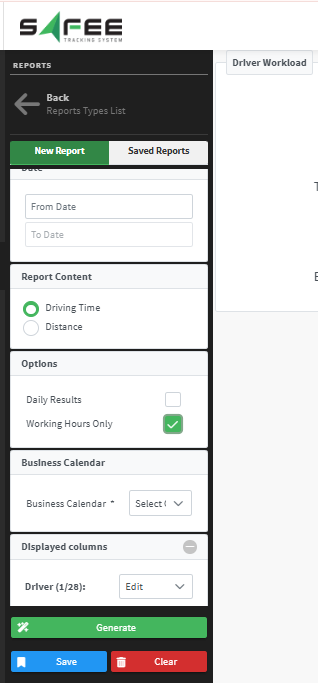
Distance / Driving Time Selection
Users can now choose whether the report displays:
- Driven Distance
- Driving Time
AG-Grid Integration
Migrated the report output to AG-Grid for:
- Better performance
- Improved filtering and sorting
- Enhanced user interaction
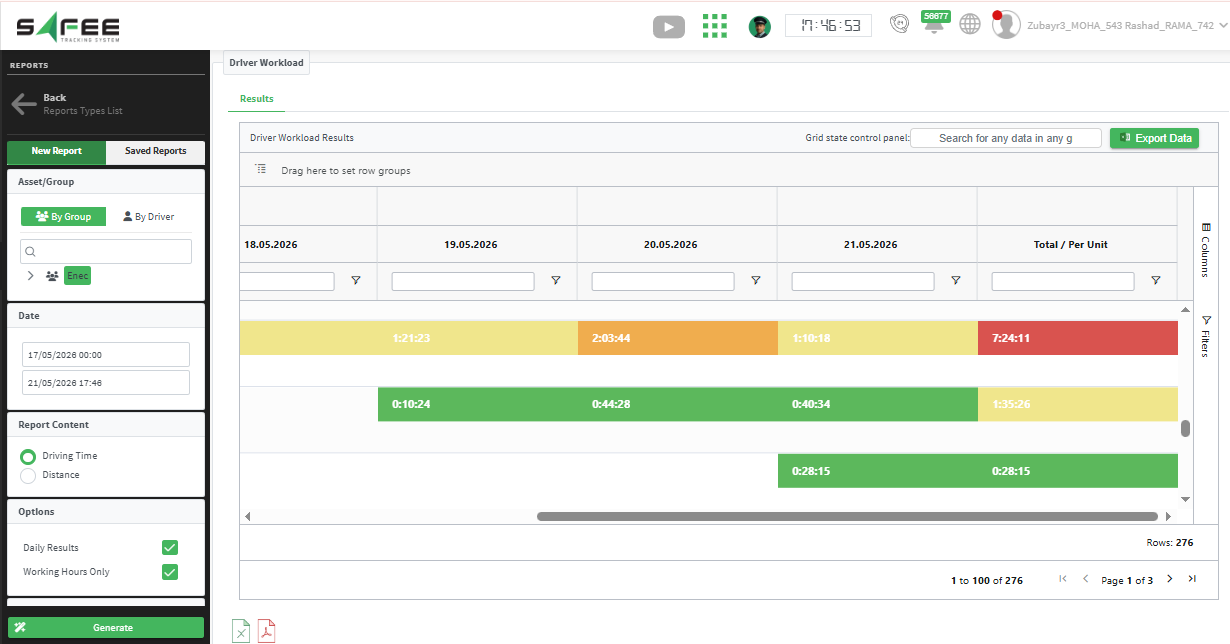
Colored Threshold Levels
Added 4-level color indicators:
- 🔴 Red
- 🟠 Orange
- 🟡 Yellow
- 🟢 Green
Distance Mode
- Thresholds are configured in ascending order:
- Red → Orange → Yellow
- Green is automatically applied to values above the yellow threshold.
Driving Time Mode
- Thresholds are configured in descending order:
- Red → Orange → Yellow
- Green is automatically applied to the lowest values.
Driver Attribute Selector
- Added support for selecting and displaying driver attributes within the report.
Enhanced Export
- Added a new exporter that preserves report color coding in exported files.
2. Offline Vehicle State Enhancement
Enhanced the handling of offline periods across the platform based on the company-defined offline settings, providing more accurate tracking, clearer visualization, and more reliable statistics and reporting across all related modules.
Key Improvements
Vehicle History Page
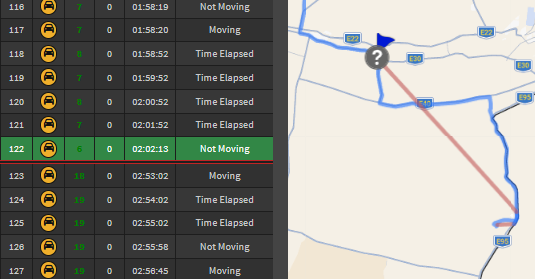
Messages Table Improvements
Offline periods are now clearly displayed in the messages table using:
- A red line marking the offline start
- A red line marking the reconnect event
Map Path Enhancements
Improved map path visualization to clearly distinguish between:
- Normal movement while the vehicle is online
- Location jumps caused by the vehicle going offline and reconnecting in another location
Offline location jumps are now displayed in red.
Statistics Accuracy
- Updated statistics calculations to automatically ignore offline periods.
Vehicle Timeline Page
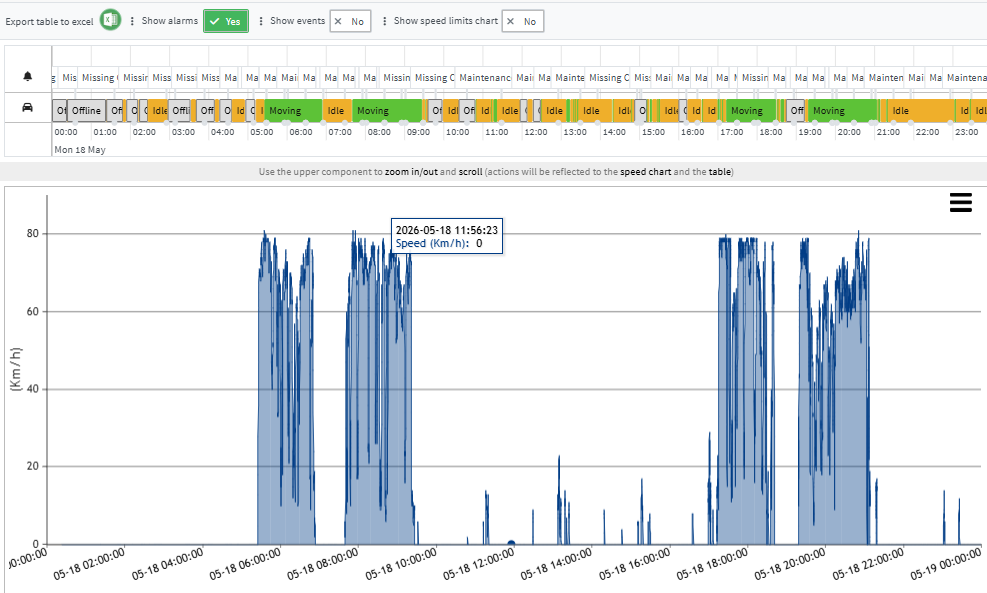
Timeline Improvements
- Offline statuses are now displayed within the main vehicle status timeline for a clearer view.
Statistics Accuracy
- Updated timeline statistics to ignore offline periods.
3. Wasl Registration Policy Update
Updated the Wasl integration to comply with the latest standards and requirements provided by Elm.
Supported Guide Versions
| Guide | Version |
|---|---|
| Inside Cities | 1.3 |
| Motorcycle Delivery | 1.2 |
| SFDA | 1.10 |
| Specialized transportation, international transportation, Educational & Rental bus Tracking | 1.6 |
| Towing Cars Service Tracking | 2.1 |
| Light Transport | 1.2 |
| Default Tracking | 1.32 |
| Transportation Between Cities Tracking Services | 2.22 |
New Registration Enhancements
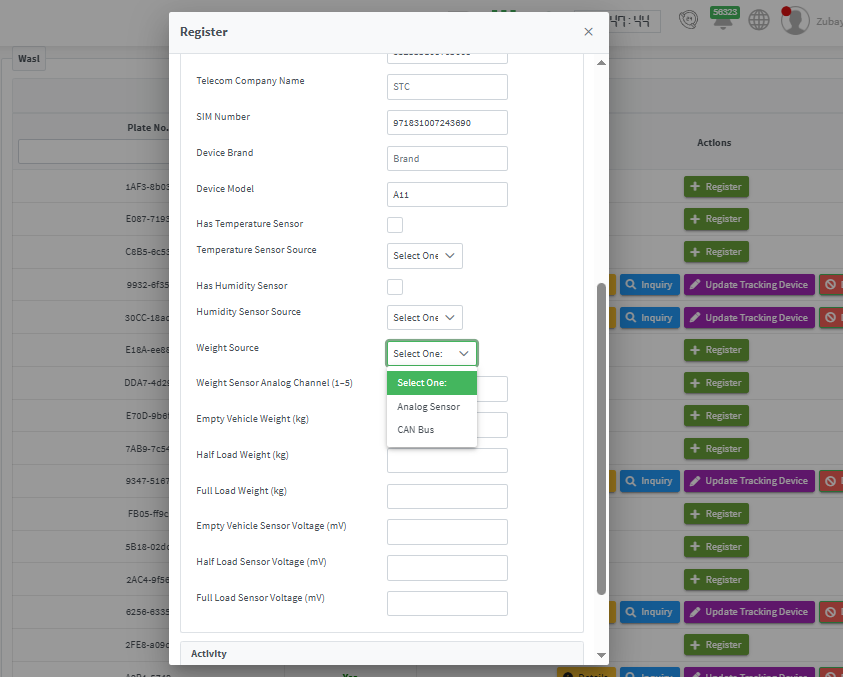
Sensor Type Configuration
The registration screen now allows selecting the sensor connection type, including:
-
For temperature and humidity sensors:
- BLE
- 1-Wire
- Other supported types
-
For weight sensors:
- Analog Weight
- CAN Bus
These new fields are available directly within the vehicle registration popup for easier configuration.
4. Vehicle Deletion Policy Update
Updated the vehicle deletion policy to improve data lifecycle management.
New Policy
- Deleted vehicles can now be restored within 90 days only.
- After 90 days, the vehicle and all related data will be permanently deleted.
Important Notes
- Vehicle restoration is performed in coordination with your partner.
- Restoring a vehicle restores its tracking data only.