Release 6.9.8
11 June 2026
1. Annual Driver KPI Report
Building on the existing Driver KPI Report, we have introduced a new Annual Driver KPI Report that provides a high-level yearly view of driver performance, safety compliance, and driving activity trends.
While the Driver KPI Report focuses on evaluating individual drivers over a selected period, the Annual Driver KPI Report enables management teams to analyze driver performance across an entire year, monitor KPI trends month by month, and assess the effectiveness of safety programs and IVMS deployments.
Report Configuration
The report supports the following inputs:
- Vehicles and/or Drivers
- Reporting Year
- Driving Threshold
- KPI Scoring Formula
- Violation Types
The selected scoring formula is used to classify drivers/distance into performance categories (such as Green, Amber, and Red) based on the same KPI methodology already available in the Driver KPI Report. The selected violation types will be used in calculating the standard violation per 100 KM as will be mentioned later, while the driving threshold will be used to ignore drives with distance less than the threshold.
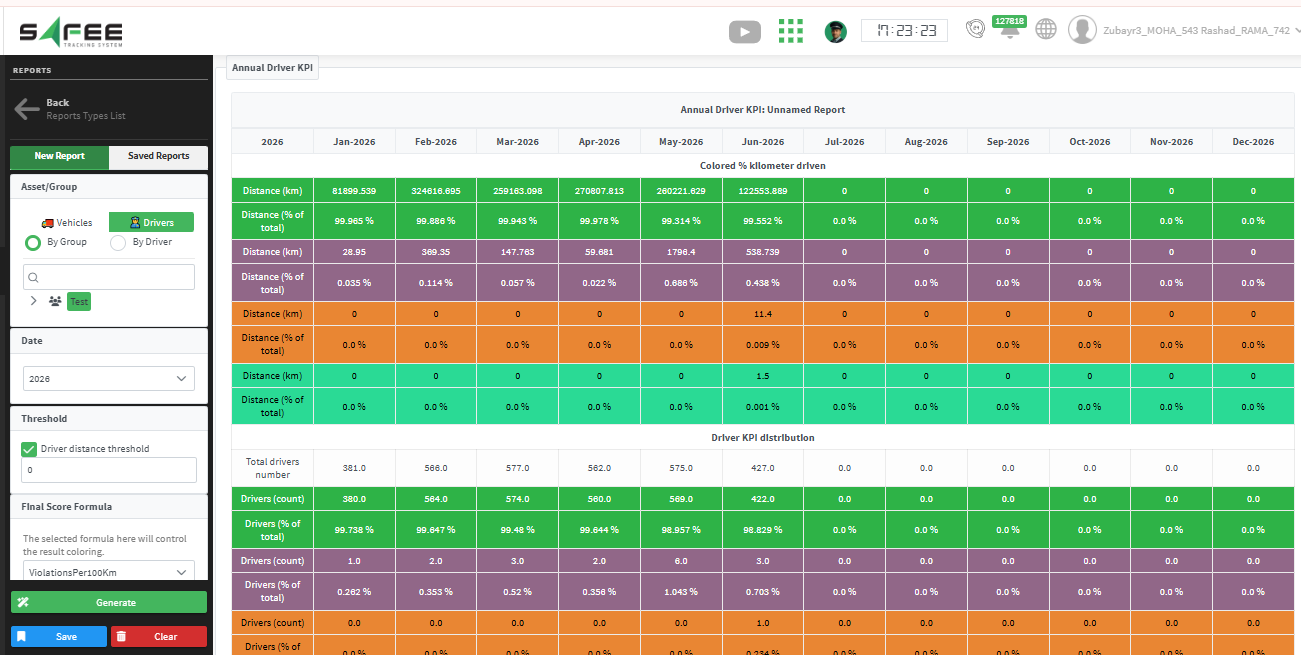
Report Outputs
Colored % Kilometer Driven
Displays the total driven distance for each month, grouped by driver KPI category.
This enables users to understand how much of the fleet’s annual driving activity was performed by drivers in each performance category and to monitor changes in driving behavior throughout the year.
Driver KPI Distribution
Displays the number and percentage of drivers belonging to each KPI category for every month.
This provides a clear view of how the overall driver population is distributed across performance levels and helps identify whether driver performance is improving or declining over time.
IVMS Penetration Analysis
Provides monthly visibility into:
- The cumulative number of vehicles equipped with IVMS devices.
- The standard violations rate per 100 km, calculated based on the selected violation types at the report input and the total distance driven each month.
Standard Violations per 100 km = (Violation Count × 100,000) / Total Distance
This metric helps normalize violation counts against fleet activity, allowing users to accurately evaluate safety performance and monitor the effectiveness of IVMS deployment throughout the year.
Violations
Displays the monthly count of violations for each selected violation type.
The report allows users to identify seasonal patterns, recurring safety issues, and long-term violation trends across the fleet.
Year-to-Date (YTD)
Provides monthly accumulated driving distances and year-to-date totals.
This section enables users to track operational activity growth and compare driving volumes throughout the reporting year.
2. Account-Based Notification Filtering
To improve notification relevance and ensure users only see information related to their own assets, we have introduced a new Account Filter option in the Notification Generator.
How it Works
- The Account Filter option can be enabled when creating a notification.
- When enabled, notifications are automatically filtered based on the vehicles assigned to each selected account.
- Users will only receive and view notifications related to their own vehicles.
- Notifications that are not related to vehicles are not affected by this option.
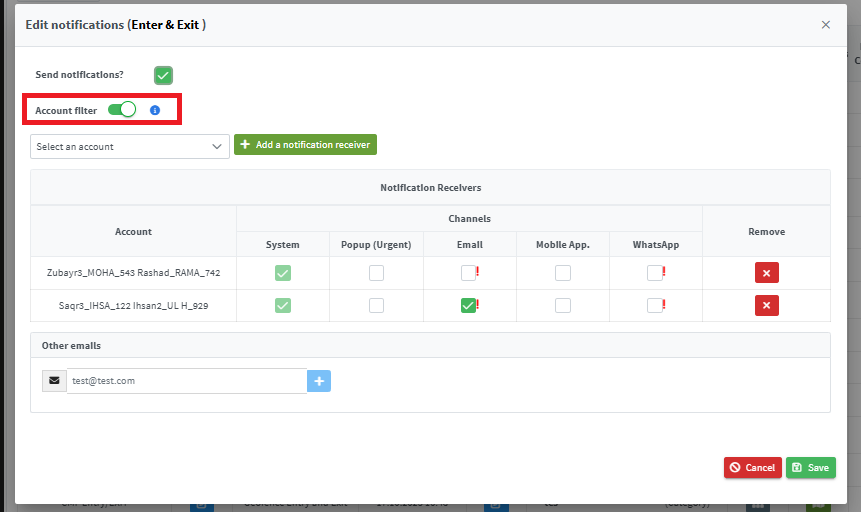
Additional Changes
- When Account Filter is enabled, notifications can only be sent to the selected accounts’ emails. External email addresses are not allowed.
- The Notifications list and Expiries Explorer now display the vehicle-related notifications and alerts associated with the logged-in account’s assets only.
Benefits
These enhancements improve privacy, reduce unnecessary notifications, and provide a more personalized experience by ensuring users only receive and view information relevant to their assigned vehicles.